ANNOSYNC · DOCUMENT CONVERSION

Convert PDFs into editable Word documents, original layout retained

Runs locally · files never uploaded Page-by-page QC report Perpetual licence · one machine per card

Converts PDFs produced by Word, InDesign, Founder typesetting or scanning into editable Word files, with every footnote placed back at its original position, footnote counts and tables restored. Scanned and outlined pages are recognised automatically, with low-confidence words highlighted in yellow. Conversion runs locally and comes with a page-by-page QC report.

For publishing and journal editors, paper authors and researchers, and report or archive teams.

After purchase and activation, the app converts the first two pages into a QC report before the whole file is processed.

Windows 10 / 11 No InDesign or Office required Installer ≈ 160 MB Perpetual licence One machine per card

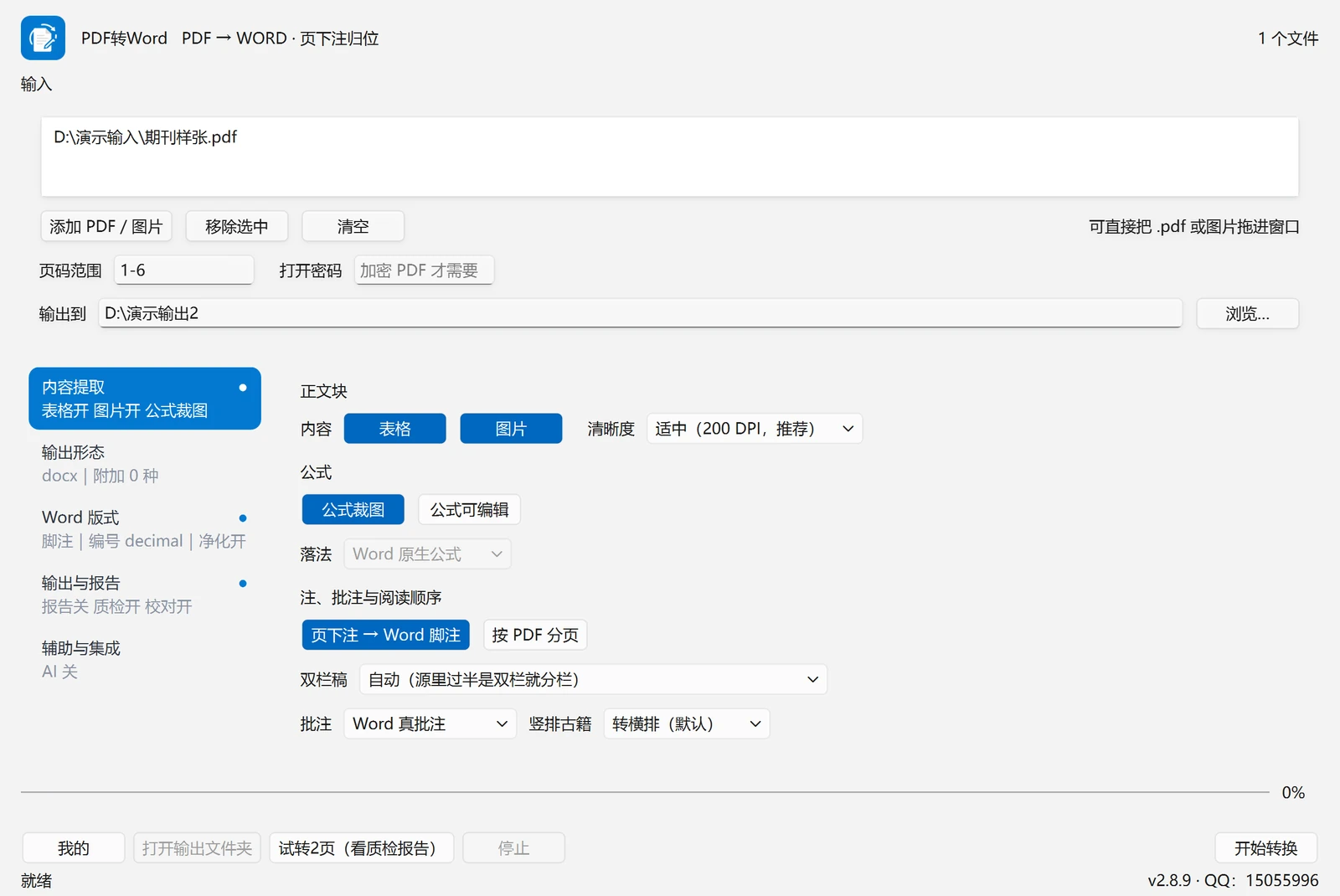
PDF to Word main window: output and options on the left, content extraction and layout options on the right
Main window: add PDFs, choose the output and options; tick tables, images, formulas, notes and annotations as needed. Interface shown in Chinese.

Use cases

Three typical use cases.

SCENE 01

Publishing / journal editors

After a PDF is finalised, text is copied into Word and footnotes and tables are rebuilt manually; mismatched references and drifting table columns require hours of page-by-page checking per book.

Conversion result: page notes become real footnotes and tables become real tables; remaining issues are listed by the conversion and QC reports for page-by-page review.

SCENE 02

Paper authors / researchers

Body text is copied from a PDF and formulas, footnotes and image positions are rebuilt individually; copy-paste loses notes and image positions and breaks formulas apart.

Conversion result: body text, footnotes, images and tables return to Word in reading order; scanned pages are recognised automatically and low-confidence words are highlighted in yellow.

SCENE 03

Archives / records teams

Scanned files have no text layer, so ordinary conversion returns blank or scrambled pages; a separate OCR tool is required and two-column pages and running heads still need manual work.

Conversion result: pages without a text layer are recognised automatically; two-column pages reflow in reading order, and running heads and table titles are handled separately, with low-confidence words highlighted for checking.

Core capabilities

01 / FOOTNOTE

Page notes become real Word footnotes

References and notes are paired and clickable; numbering can restart per page or run across the document.

02 / TABLE

Tables are rebuilt as real Word tables

Bordered, three-line and shaded tables are restored by rows and columns; tables can also be saved to Excel/CSV for comparison with the source.

03 / OCR

Automatic OCR for scanned and outlined pages

Pages without a text layer are recognised automatically; low-confidence words are highlighted in yellow for word-by-word checking.

04 / READING ORDER

Reading order, headers and vertical text

Two-column pages reflow or flatten automatically; vertical-text books can convert to horizontal or stay vertical, and running heads and table titles stay out of the body.

05 / BATCH

Batch queue and resume

Queue multiple files, retain completed output on stop, resume after interruption and retry failed items separately; after purchase and activation on this machine, convert the first two pages into a QC report before the whole file is processed.

06 / OUTPUT

Multiple outputs and style templates

Word / Markdown / plain text; tables to Excel/CSV, plus images, PPT, long images and per-chapter splitting; apply or reverse-engineer a style template.

Page-by-page QC report

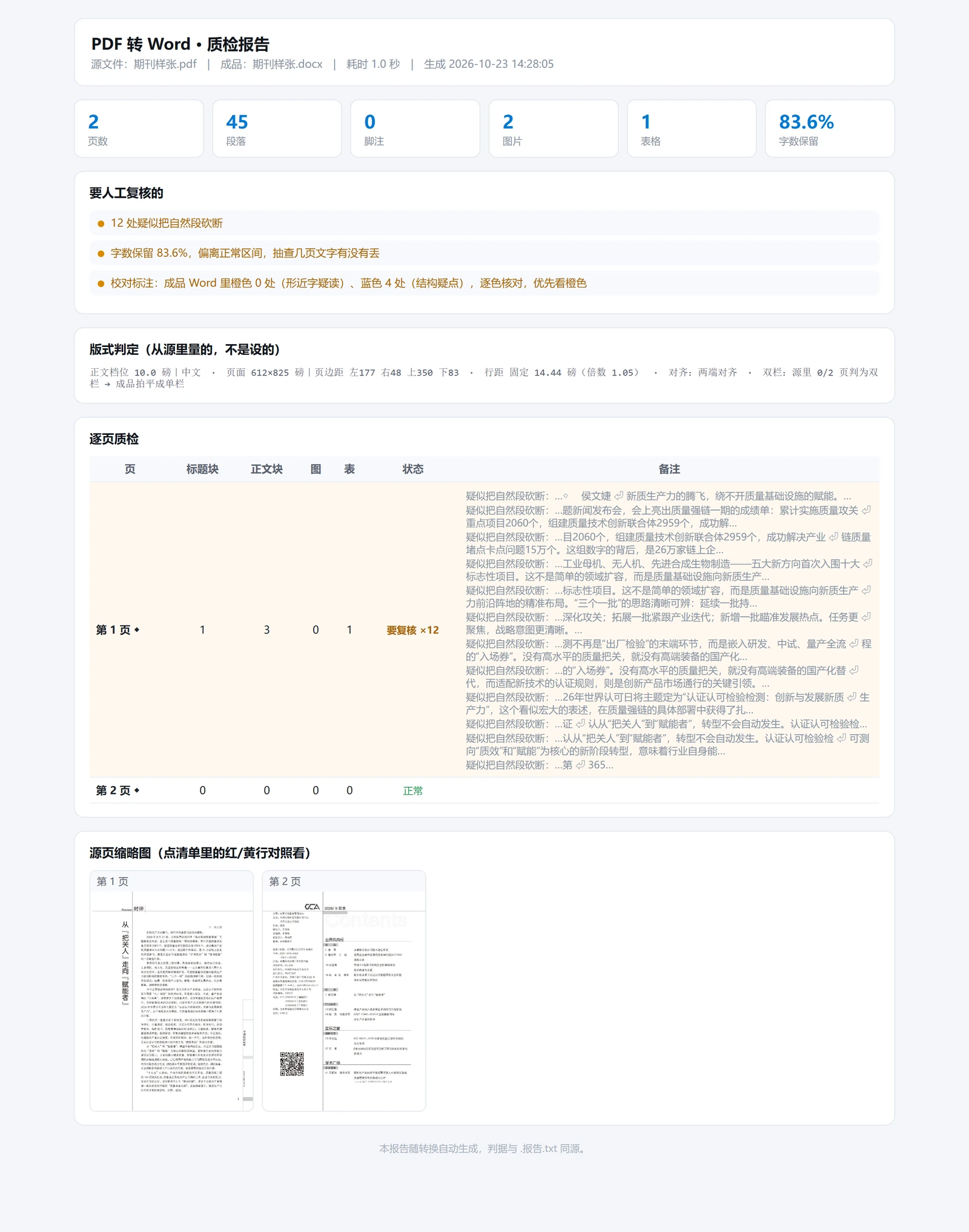
Every run produces a report listing pages requiring attention, the number of items to review and the text retention ratio, reducing page-by-page checking (click a report to open it full size).

QC report for a journal sample: page 1 lists 12 points to check, page 2 is normal
When something needs attention: the journal sample has 2 pages, 45 paragraphs and 1 table; page 1 lists 12 points to check (each with the source text and position) while page 2 is marked normal, with source-page thumbnails alongside.
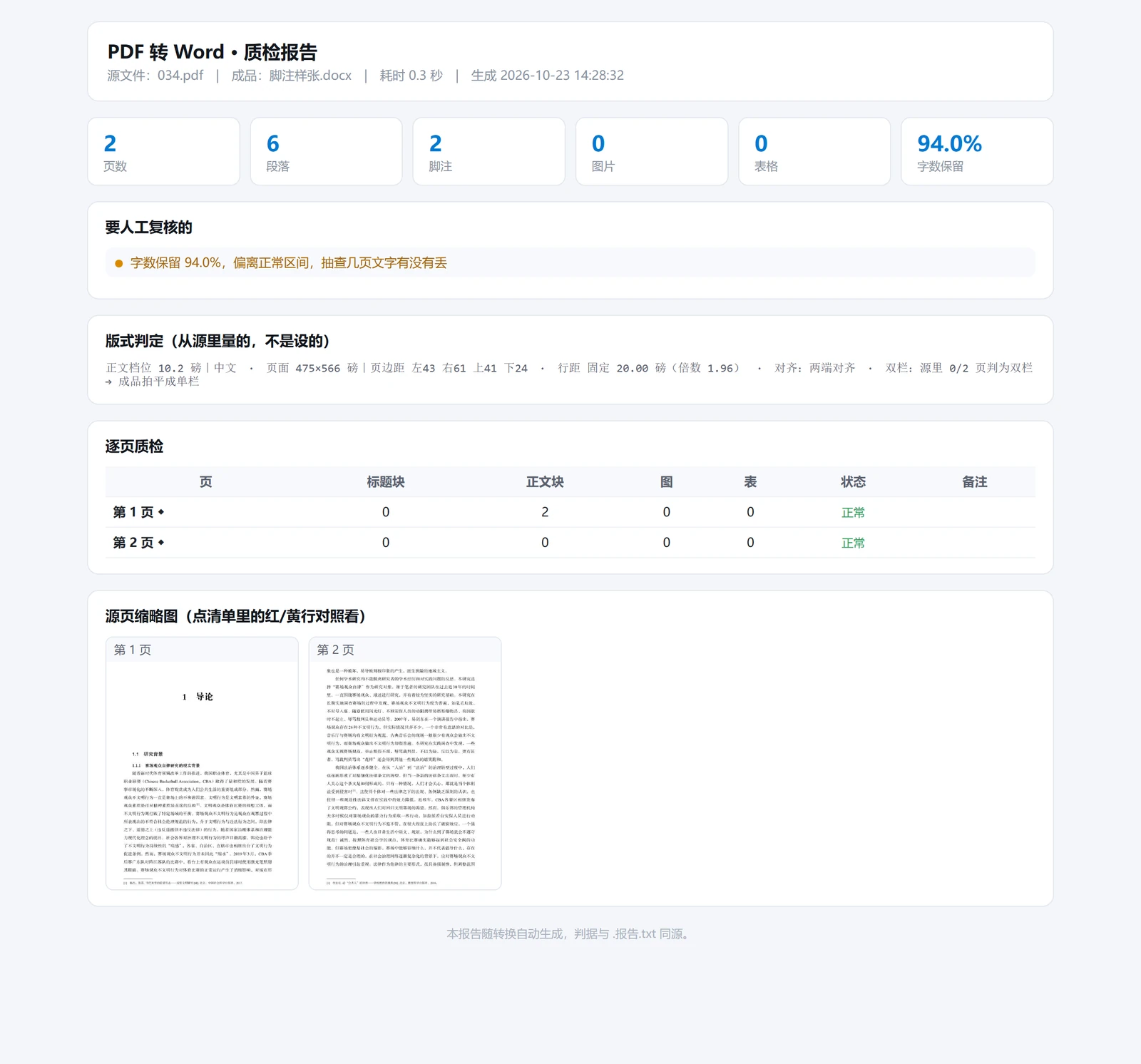
QC report for an academic sample: 2 footnotes, 94.0% of characters retained, both pages normal
When no issues occur: the academic sample has 2 pages and 2 footnotes with 94.0% of characters retained; both pages are marked normal, and the report only suggests spot-checking selected pages for text completeness rather than raising unnecessary warnings.

Boundaries

Confirmed capability boundaries and usage limits.

Usage limits

  • OCR results for scanned pages need human review; similar-looking characters can be misread. Yellow highlighting is a locator, not a guarantee of correctness.
  • The installed build does not include editable-formula (OMML) conversion: the option is greyed out and formulas are retained as images, viewable but not editable in Word. The build with a Python environment supports this feature.
  • Photographed vertical-text books: OCR writes recognised text back horizontally, so vertical direction and order may be lost. Such documents should be pre-processed with a dedicated OCR tool or converted to horizontal text first.
  • Complex tables (merged cells, diagonal headers) have no reliable boundary signal; some columns may require minor adjustment in Word.
  • Licence and offline use: perpetual licence, one machine per card; activation requires one online check; after a long period without a licence check, conversion pauses until the next online check.

Workflow

Four steps.

STEP 01

Add PDFs

Drag files into the window or select Add PDF; multiple files can be selected at once. Encrypted files require the password once.

STEP 02

Select output and options

Word / Markdown / plain text; footnotes at the page bottom or as endnotes; follow PDF pagination; retain or flatten two columns.

STEP 03

First two pages

After purchase and activation, convert only the first two pages and review the QC report; confirm tables, footnotes and headings before processing the full file.

STEP 04

Review report and output

The report counts footnotes, line breaks and hyphenation and lists items requiring human review. Output and report are written to the same folder.

Licence and updates

Buy once, not per use.

LICENCE

Perpetual, one machine

One card binds one computer; activation needs one online check. To switch machines, unbind on the old device and enter the card on the new one.

UPDATE

Automatic updates

A background check at start-up shows a prompt only when a new version exists; a download entry is provided, but the installer is not run automatically.

OLD BUILDS

Old versions ask to update

When a build is three or more versions behind, conversion cannot continue. If the version information cannot be read, conversion works as usual, so an offline customer is not locked out.

Specifications

Local processing

Conversion runs locally and documents do not leave this machine; network access is used only for activation, licence checks and update checks. The AI assistant is disabled by default and, when enabled, accesses only the configured endpoint.

Changing devices

Unbind the original device first, then enter the card key on the new device. Contact support if the original device is unavailable.

Scanned documents

Pages without a text layer are recognised automatically, and low-confidence words are highlighted in yellow as locators. For important documents, review the QC report as well.

Footnotes and tables

Page notes become real Word footnotes and tables become real Word tables. For complex tables, save the table to Excel first and compare it with the source, then adjust in Word if required.

Supported environment

Windows 10 / 11 (64-bit). Conversion does not require InDesign or Office; opening the .docx requires Word, WPS or another compatible application.

Purchase and installer

The download is available immediately after payment and can be retrieved again under Account → My tools.

Convert PDFs to editable Word

Perpetual licence · one machine per card · automatic updates · one online activation check

¥158 / machine
ANNOSYNCJiuxiao Wujie ID tools support QQ: 15055996·© 2026 Beijing Jiuxiao Wujie Technology Co., Ltd. All rights reserved. · ANNOSYNCBusiness License·ICP Filing·Public Security FilingBeijing Public Security Filing 11010502063040·Privacy·Terms of Service·Legal Notice